 using WordPress and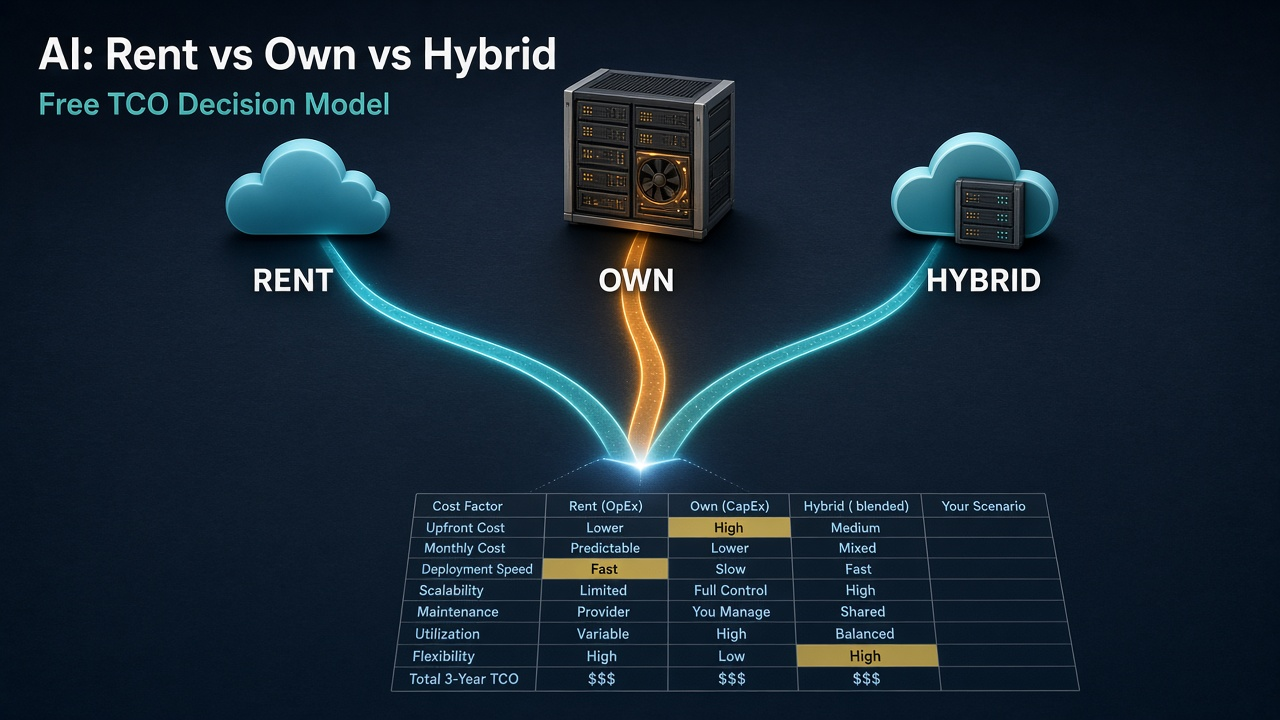
Sooner or later, most AI budget conversations end up at the same fork in the road. Do we keep paying for API calls to the big frontier models, do we buy our own GPUs and run open models in house, or do we do some of both?
The trouble is that most of the math people bring to that meeting is a token-burn estimate. Take your monthly tokens, multiply by the price per million, compare it to a quote for a rack of GPUs, done. That number leaves out most of what owning actually costs: power, colo space, hardware that loses value fast, the people you need to keep it running, and whether you’ll even keep the thing busy enough to pay for itself.
So I built a spreadsheet that puts all of that in one place. It’s called the AI Acquisition Strategy: Rent vs. Own vs. Hybrid TCO Decision Model, it’s on version 1.6, and it’s free. Download link is right here, and again at the bottom.
What it is
It’s a total cost of ownership model in Excel that compares three ways to bring AI into an organization:
- Rent the Frontier. Pay per token for frontier models through their APIs.
- Own the Frontier. Buy the hardware (GPUs, servers, networking, storage) and run open or self-hosted models yourself.
- Hybrid. Serve part of your volume on owned gear and send the rest to an API.
You put in your own numbers, and it lays out the costs for all three side by side, year by year, then tells you which one is cheapest over your analysis horizon on a present-value basis, with a short explanation of why. No macros, no add-ins, just regular Excel formulas you can click into and check.
Who it’s for
I built it for the people who end up owning this decision: technology finance leaders, CFOs, CIOs, and the executives who have to sign off on either a big CapEx request or a growing API bill. It’s also handy for the engineers and architects who get asked “so what would it cost to just run it ourselves?” and need something better than a napkin.
I tried to lay it out the way finance people already think. Depreciation down to a residual value, one-time versus recurring costs, inflation on the non-API stuff, a discount rate, present value and NPV, cost per unit, and a multi-year view. If you’ve looked at a capital request before, none of it should feel foreign.
Why I built it
The rent vs. own question sounds simple and it isn’t. The pieces that tend to get left out are also the ones that swing the answer the most:
- Power and facilities. GPU clusters pull real power, and you pay for it twice, once at the meter (times your PUE) and again for colo or facility space.
- Depreciation. AI hardware ages fast. A useful life of three years is a common assumption, and what the gear is worth at the end is anybody’s guess.
- Staffing. MLOps and platform engineers are often the biggest hidden cost of owning. The model treats them as fully loaded FTEs, not a rounding error.
- Utilization. You have to size owned capacity for your peak, plus some headroom, so on average a chunk of it sits idle. Renting means you never pay for idle hardware.
- Productivity. The whole point is getting more done, so the model has an optional view that puts a dollar value on AI-assisted output next to what the AI costs.
Pulling those together in one place, with every assumption visible and editable, is the gap this fills. It won’t make the decision for you, but it’ll make the conversation a lot more honest.
How it helps
- It gives you a structure for the decision. Every assumption sits on one sheet, so you can walk a room through exactly what you assumed and why.
- It compares multi-year TCO side by side. Years 1 through 5 for each path, a nominal total for your chosen horizon, fixed 3-year and 5-year totals, and present-value TCO at your discount rate.
- It shows unit economics. Year 1 cost per million tokens for all three paths, on the same basis, which is the number most people actually want.
- It tells you the break-even utilization. How busy owned GPUs have to stay to match what the API would charge for the same tokens, next to how busy they can realistically be. It also tells you how much more volume you’d need before owning pays off.
- It factors in agent multipliers and productivity capture. So you can see the value of the work next to the cost, including an NPV of net benefit for each path.
- It runs the sensitivities for you. Twelve key drivers get flexed up and down automatically, and you can see which ones actually change the answer.
How to use it
Start on the Cover sheet
The Cover sheet has a short purpose statement, the how-to steps, a list of the key outputs, and the disclaimers. Give it a minute, then head to the Inputs sheet. That’s where you’ll spend most of your time.
Know which cells you can change
On the Inputs sheet, every editable input is blue text on a yellow fill. Anything in black is a label or a calculated check. The low and high factor cells on the Sensitivity sheet are blue on yellow too. Leave the Calculations and Sensitivity_Engine sheets alone. They’re the engine, and they say so right at the top.
Fill in the Inputs sheet, section by section
There are eight sections. Here’s what each one wants and what the shipped defaults look like. The defaults are illustrative mid-market examples based on 2026 industry ranges, not recommendations. Swap in your own numbers.
- Scale, people and productivity intent. How many individual contributors (ICs) will use AI (default 50), their fully loaded annual cost (default $180,000), the AI agent multiplier, meaning how much effective output each person gets (default 2.5x), and the productivity capture rate, the share of that theoretical gain you actually expect to realize (default 40%). There’s also a free-text field to describe your main use case.
- Workload mix and intent. Split your volume three ways: frontier-critical work that needs the latest closed models (default 20%), routine high-volume work that open or self-hosted models can handle (default 55%), and sensitive or regulated work where you’d rather own it for control (default 25%). A check cell tells you if they don’t add up to 100%. This mix sets the hybrid split, more on that below.
- Token and compute demand. Pick a method from the dropdown. “Agent multiplier derived” estimates monthly tokens per IC from the agent multiplier, tokens per agent-hour (default 50,000) and working hours per month (default 160). “Direct monthly estimate” uses your own tokens-per-IC number instead, if you have real usage data. If you pick it and leave that number at 0, the model falls back to the derived estimate. You also set annual usage growth (default 40%) and the peak-to-average ratio (default 2.5x), which feeds straight into how much owned capacity you have to buy.
- Rent the Frontier (API). Blended API cost per million tokens (default $8), the expected annual drop in API prices (default 25%), how much caching and prompt optimization cut your effective cost (default 30%), a one-time integration cost, annual platform, governance and observability cost, and the engineering FTEs and loaded cost to keep it all tuned.
- Own the infrastructure. All-in CapEx per GPU, including its share of the server, networking and storage (default $50,000), useful life (default 3 years), residual value at end of life (default 30%), power draw per GPU (default 1.25 kW), PUE, electricity rate, colo cost per kW per month (or a flat annual facility cost instead), annual maintenance as a percent of CapEx, MLOps and platform licenses, the number of engineering FTEs and their loaded cost (default 4 at $250,000), a one-time build and migration cost, and an N+1 redundancy factor (default 1.3x).
- Hybrid. By default the owned share comes from your workload mix: routine plus sensitive work goes to owned gear, frontier-critical work goes to the API. With the default mix that’s 80% owned. If you want a different split, type it into the manual override cell. Leave it blank to keep the derived number. There’s also a one-time hybrid integration premium for the extra plumbing.
- Financial parameters. Analysis horizon from 1 to 5 years (default 3), which drives the horizon totals and the recommendation. The discount rate, your WACC or hurdle rate (default 10%), is used for present value and NPV. Then there’s annual cost inflation for the non-API costs (default 3%) and a Yes/No switch for the productivity value view.
- Own capacity sizing and hybrid staffing. Sustained throughput per GPU in tokens per second for the model you’d actually run (default 625, benchmark your own), and the engineering FTEs needed to run the owned side of a hybrid setup (default 3).
How the owned side gets sized
This part’s worth understanding before you trust the output. The model takes your demand for each year, converts it to tokens per second, multiplies by the peak-to-average ratio and the N+1 factor, and divides by throughput per GPU to get the number of GPUs you’d have to install. CapEx, power, colo and maintenance all follow from that count. Capacity only ever grows, and GPUs get replaced at the end of their useful life, with the residual value credited back.
One side effect falls right out of the math. If you size for peak plus headroom, your average utilization can’t go higher than 1 divided by (peak-to-average times N+1). With the defaults that’s about 31%. That ceiling matters a lot when you look at break-even.
Read the Dashboard
The Dashboard is the one-page answer. At the top it shows the recommended path, which is whichever option has the lowest present-value TCO over your horizon, and a short rationale. The rationale includes a plain-language read on break-even utilization, and it flags it when hybrid lands within 10% of the winner.
Below that are the key metrics: present-value and nominal TCO for all three paths, Year 1 cost per million tokens for each, Own break-even utilization next to expected utilization, break-even volume as a multiple of your Year 1 volume, hybrid break-even, productivity value, and the NPV of net benefit for the recommended path. It also echoes your workload mix, the owned share hybrid is using, and how many GPUs each path installs.
For a sense of scale, here’s what the shipped illustrative defaults produce over the default 3-year horizon. The Dashboard recommends Rent, at about $915K present-value TCO ($1.09M nominal), versus about $3.30M to own ($3.88M nominal) and about $3.54M for hybrid ($4.13M nominal). Owning would need about 391% utilization to break even, which can’t happen, and it doesn’t pay off until volume is roughly 33x the Year 1 estimate. Those numbers come from sample inputs for a 50-person team, not a verdict on your situation. A bigger, steadier, more routine workload can flip it.
Understanding break-even utilization
Break-even utilization is the average utilization your owned GPUs would need to hit for their Year 1 recurring cost (depreciation, power, colo, maintenance, licenses and staff, less the platform and engineering costs the API path would carry anyway) to match what the same tokens would cost on the API. Compare it to two things: the expected utilization the model calculates, and the roughly 65-70% that multiple TCO studies treat as a realistic sustained ceiling.
- Above 100%: at this volume, owned hardware can’t beat the API even running flat out.
- Between about 70% and 100%: possible on paper, hard to sustain in real life.
- Below expected utilization: owning clears break-even on a Year 1 run-rate basis, as long as the demand actually shows up. It can still lose over the full horizon once one-time costs and falling API prices are counted, and the Dashboard says so when that happens.
The Comparison sheet also shows a hardware-only version that leaves out staff and licenses, plus the break-even annual volume. That’s handy when the fully loaded number is huge and you want to know whether it’s the GPUs or the team that’s sinking the case.
Go deeper on Comparison and Sensitivity
The Comparison sheet has the year-by-year table for all three paths. It shows Years 1 to 5, the horizon total, the 3-year and 5-year totals, present-value TCO, NPV of net benefit, and Year 1 cost per million tokens. Below that are the lowest-cost path on both a present-value and nominal basis, the utilization block, and the capacity sizing summary.
The Sensitivity sheet reruns the entire model for each key driver at a low and a high value, with everything else left at base. Those drivers are agent multiplier, productivity capture rate, blended API price, CapEx per GPU, residual value, Own engineering FTEs, peak-to-average ratio, N+1 factor, hybrid owned share, throughput per GPU, usage growth and discount rate. The factors default to 0.75 and 1.25, and you can change them. For each case you get present-value TCO for all three paths, the lowest-cost path, Own break-even utilization and NPV. A swing table at the bottom shows how much each driver moves each path and whether it changes the answer.
And there’s a Notes_Sources sheet at the end that explains the model’s thinking on depreciation, staffing, productivity, hybrid logic, utilization and capacity sizing, and the present-value method. It also covers what the defaults were drawn from, its limitations, and suggested next steps. Worth a read before you take the numbers into a meeting.
Everything is live
Every output is a regular Excel formula. Change any input and the whole workbook recalculates, Sensitivity sheet included. It’s general purpose on purpose, so there’s nothing specific to any one industry or vendor baked in.
A quick five-minute run
- Download the workbook and open the Inputs sheet.
- Put in your IC count and fully loaded cost per person.
- Pick a demand method. Use “Direct monthly estimate” if you have real usage data, otherwise leave it on derived and adjust the agent multiplier and tokens per agent-hour.
- Replace the API price, CapEx per GPU and throughput per GPU with real quotes and benchmarks, even rough ones.
- Set the engineering headcount for each path honestly. This one moves the answer a lot.
- Check the Dashboard, then open the Sensitivity sheet and look at the swing table to see which drivers actually change the answer.
A few things to keep in mind
This is a decision-support tool. It isn’t financial advice, a bid, or a promise of any outcome. Real costs swing a lot with workload, utilization, data residency, talent, hardware prices and how well the project’s run. Validate every assumption with current vendor quotes, your own internal data and pilot numbers, and the people who know your environment.
Treat residual value with extra suspicion. What a GPU is worth in three years is genuinely uncertain and can change quickly when a new generation ships. Stress-test it low. The Notes_Sources sheet also lists what the model doesn’t cover, like data egress and compliance audit costs.
Grab it
It’s free, and you don’t need to sign up for anything. If you use it, I’d really like to hear what you changed and where it was wrong for your situation. That’s how the next version gets better. Drop a comment or find me on LinkedIn.
AI Acquisition Strategy: Rent vs. Own vs. Hybrid TCO Decision Model, Version 1.6. Designed by Ryan Huff.
Keep reading
If you made it this far, here’s what I’d read next:
- The Machines Were Always Trying to Talk. The Hardware Finally Let Them. How AI actually works under the hood, and why the hardware this model is pricing out was the thing that made LLMs possible.
- How to Build Your Own Private Family Streaming Service. The other side of rent vs. own, at home. Three Raspberry Pi 5s running my family’s whole streaming setup.
No responses yet